The main new feature is the new button "Edit current field". Open, say, ledger accounts form from main menu, select "Tax group" field and click this button.
You will see AOT for StringEdit:Tax_TaxGroup.
I think this button fill be helpful for developers and consultants to explore axapta functionality.
more...
Monday, November 27, 2006


Wednesday, November 22, 2006
Bunch of Tabax extensions
There are some Tabax extensions occured last week.
- AxCreateNewProject from Ivan Kashperuk to create an empty project with two clicks
- Toggle SQL trace for switch SQL trace On/Off instantly with tabax toolbar button (it can be used an example of reflecting state of something via button image )
- Just a button to run the find dialog for AOT node quickly
Sunday, November 19, 2006
AxPath is coming: Sidax 0.4 beta 0 + Tabax 0.2.10
download tabax | download sidax
There is the first AxPath implementation. AxPath let you store a link for some record in database or an AOT item in the form of URI and then send it to a collegue or open it. So, for example you can copy link to the some purchase order, send it to colleague and it will be opened by colleague (so purchase orders form is opened and positioned at specific order).
Now Tabax, and Sidax support this technique. I am planning integration of AxPath scheme in the system letting AxPath links to be embedded in the webpages, mails, etc.
so, in Sidax:
in Tabax:
I am going to implement "favorits" in the sidax based on AxPath
There is the first AxPath implementation. AxPath let you store a link for some record in database or an AOT item in the form of URI and then send it to a collegue or open it. So, for example you can copy link to the some purchase order, send it to colleague and it will be opened by colleague (so purchase orders form is opened and positioned at specific order).
Now Tabax, and Sidax support this technique. I am planning integration of AxPath scheme in the system letting AxPath links to be embedded in the webpages, mails, etc.
so, in Sidax:
- you can copy AxPath of the menu item in main menu with right click
- you can navigate AxPath via "go component"
in Tabax:
- AxPath:
- when pressing the "Copy" button it copies axpath of the current record to the clipboard
- when pressing the «Ctrl+Shift+Copy» it copies AOT items, currently selected
- if you insert axpath to the input box it navigates the path given
- when pressing the "Copy" button it copies axpath of the current record to the clipboard
- now tabs are switched correctly under AX3KR3
- X++ calculator in the input box:
- enter ?<X++ expression> and press Enter to evaluate an expression
- enter ?<X++ statement> and press Enter to run a statement
- enter ?<X++ expression> and press Enter to evaluate an expression
I am going to implement "favorits" in the sidax based on AxPath
Wednesday, November 15, 2006
aggreg8.net - trying to aggregate all Dynamics Ax development blogs
Microsoft launched the new site for IT pros - aggreg8. I have'nt realized what it is exactly, but created the workgroup for Dynamics Ax and aggreated some development blogs there: view online
Monday, November 13, 2006
Sidax 0.3.7b14
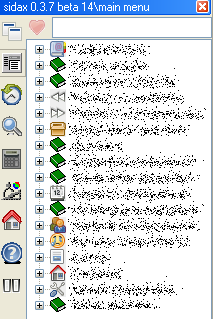
changes:
- Autohide option at about tab - sidax will autocollapse when you move mouse out of it's window (thank to Blokva from AxForum)
- Images in the main menu - different menues
Thursday, November 09, 2006
Sidax 0.3.7 beta 12
Axapta hangs when trying to exit from the thin client. Added workaround for this bug. Axapta will still hang if you login and then immediately close it, but I think this is a very rare case.
download
download
Wednesday, November 08, 2006
Monday, November 06, 2006
Sidax 0.3.7 beta 11
download (35k)
PS: Axaptapedia is online again
- It can handle a project renaming correctly now
- Pause button at 'about' tab: you can stop the background processes so sidax doesn't affect profiler
PS: Axaptapedia is online again
Thursday, November 02, 2006
Tabax 0.2.8
download 20K
What's new:
What's new:
- Extensibility !!!: Now you can add plugins to Tabax: just create a subfolder
\Share\Include\tabax\plugs and place bitmap with the following name _ .bmp, where type of menu item, ItemName - name of an existing menu item and tabax will have an additional button with placed image pointing to your menu item (download table structure browser plugin for example) - AxSearch: Tabax now have a new input box for invoke AxSearch from it
osalt - the site colleting open source alternatives to various soft
for example, http://www.osalt.com/photoshop - list of open source alternatives to to Adobe Photoshop
Monday, October 30, 2006
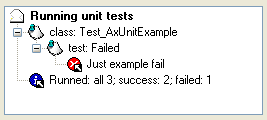
Saturday, October 28, 2006
Friday, October 27, 2006
Axaptapedia is down II
Just contacted Andrew Jones via email:
so it isn't fatal
Hi Max
Thanks! I'm on holiday for a month so hadn't looked at it. I'll see what I can do from outback Australia!
so it isn't fatal
Tuesday, October 24, 2006
Axapta sites search
Just created axsearch (using google coop) - customized search engine for Dynamics Ax Sites
Friday, October 20, 2006
Tabax, Sidax and KR3
Just updated Tabax for work with Kernel Rollup 3 - see homepage for details
Sidax has been updated also:
Sidax has been updated also:
- MainMenu is cached now at first load - so you can work after Sidax start immediately (go 'about' tab for cache refresh button)
- 'House'option: you can add any number of windows to the sidax: for example I prefer to run current project window inside it
- When you click on minmized window in the 'window' tab of sidax it will be restored
Monday, October 09, 2006
Sidax 0.3.7 beta 5 -- AOT included
download latest beta of sidax. Changes
- AOT included!!! thanx top IPv6 from AxForum: all problems with built-in AOT was resolved so you have a sidax with AOT in it
- X++ calculator changes
- It can output objects and containers
- It gets sidax as parameter (try to run sidax.collapse())
- Small other changes
Friday, September 22, 2006
Tuesday, September 12, 2006
[ann] Sidax 0.3.6 -- X++ calculator; Go component
Download from axaptapedia
X++ calculator -- evaluate X++ expression or run X++ statement
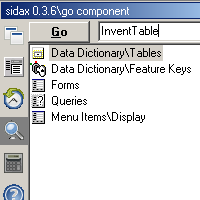
Go component -- enter component name and choose concrete component from list. You can enter path like "\Data Dictionary\Tables\VendTransOpen"

X++ calculator -- evaluate X++ expression or run X++ statement
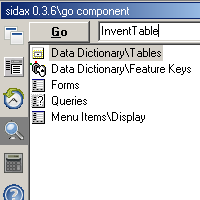
Go component -- enter component name and choose concrete component from list. You can enter path like "\Data Dictionary\Tables\VendTransOpen"

Subscribe to:
Posts (Atom)